Updated October 2026: the workflows described here were consolidated into four.
A static site has no servers to deploy to, so it is easy to assume it needs no pipeline. This site disagrees: the build needs Ruby and Python, the output is post-processed, the Markdown has to pass a formatter, and a broken link is the most common regression a content site ships. Four workflows in .github/workflows/ handle that now, and three of them run the same production build, defined once as a composite action in .github/actions/build-site. The table below lists them; the rest of this post reads the six workflows they replaced, as they were when it was written, then adds the general practices I would apply to any static-site pipeline.
The workflows at a glance
| Workflow (file) | Trigger | What it does |
|---|---|---|
CI (ci.yml) | every pull request; manual dispatch | Format: every formatter in .pre-commit-config.yaml in check mode, then the gallery, image, search and math tests. Build and check: the shared production build, then internal links, the page-weight budget and search relevance |
Deploy (deploy.yml) | push to main, path-filtered; manual dispatch | the shared production build, published with actions/deploy-pages; when a gallery CDN is set, the gallery photos go to Cloudflare first |
External links (links.yml) | weekly schedule; manual dispatch | lychee over the Markdown sources of posts, pages, projects and news, with a seven-day cache |
Accessibility (axe) (axe.yml) | manual dispatch only | the shared production build, served locally, then axe against one page |
The deploy workflow
Triggers and path filters
The workflow runs on pushes and pull requests to main, but only when files that affect the output change. The filter is a list of globs with negations:
on:
  push:
    branches: [main]
    paths:
      - "assets/**"
      - "**.bib"
      - "**.html"
      - "**.liquid"
      - "**/*.md"
      - "**.yml"
      - "Gemfile"
      - "Gemfile.lock"
      - "!.github/workflows/prettier.yml"
      - "!CONTRIBUTING.md"
      - "!README.md"
  workflow_dispatch:
A change to README.md or to another workflow's YAML does not trigger a rebuild. The workflow_dispatch entry is the manual override: it lets me redeploy from the Actions tab when something outside the repository changed, such as a remote data source the build fetches.
Permissions and caching
permissions:
  contents: write

jobs:
  deploy:
    runs-on: ubuntu-latest
    steps:
      - uses: actions/checkout@v4
      - uses: ruby/setup-ruby@v1
        with:
          ruby-version: "3.3.5"
          bundler-cache: true
      - uses: actions/setup-python@v5
        with:
          python-version: "3.13"
          cache: "pip"
      - uses: fjogeleit/yaml-update-action@main
        with:
          commitChange: false
          valueFile: "_config.yml"
          propertyPath: "giscus.repo"
          value: ${{ github.repository }}
contents: write is needed because the deploy step pushes the built site to a branch. It is the only permission granted; the default token has no other scopes.
Two caches keep the job short. bundler-cache: true makes setup-ruby run bundle install and cache the installed gems keyed on Gemfile.lock, so a run with unchanged dependencies restores them instead of compiling native extensions. cache: "pip" does the same for the Python packages the build needs (nbconvert, for notebooks). The yaml-update-action step rewrites one key in _config.yml at build time so that the Giscus comments widget always points at the repository the workflow runs in, without committing the change; that matters for forks.
Build, purge, publish
- name: Install and Build
  run: |
    pip3 install --upgrade nbconvert
    export JEKYLL_ENV=production
    bundle exec jekyll build
- name: Purge unused CSS
  run: |
    npm install -g purgecss
    purgecss -c purgecss.config.js
- name: Deploy
  if: github.event_name != 'pull_request'
  uses: JamesIves/github-pages-deploy-action@v4
  with:
    folder: _site
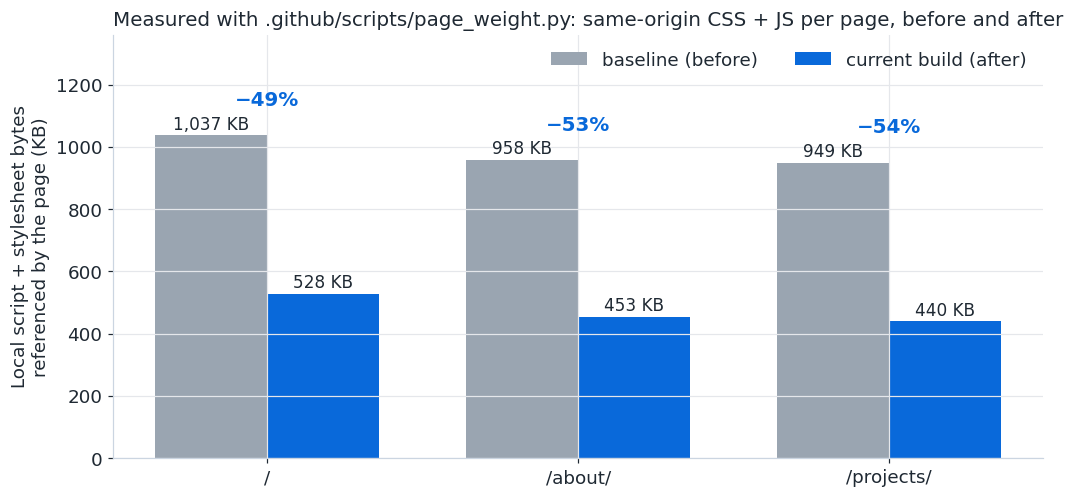
JEKYLL_ENV=production turns on the HTML minifier and JavaScript compression that the development build skips. PurgeCSS then reads every generated HTML and JavaScript file and strips selectors from the compiled stylesheets that nothing references, which is how a Bootstrap-based theme ends up shipping a fraction of Bootstrap.
The deploy step publishes by committing _site to a branch that GitHub Pages serves. The if: guard is the whole PR story: a pull request runs every step up to and including PurgeCSS, so a build error or a Liquid mistake fails the check, but nothing is published until the merge commit lands on main.
The complete deploy.yml
name: Deploy site

on:
  push:
    branches:
      - master
      - main
    paths:
      - "assets/**"
      - "**.bib"
      - "**.html"
      - "**.js"
      - "**.liquid"
      - "**/*.md"
      - "**.yml"
      - "Gemfile"
      - "Gemfile.lock"
      - "!.github/workflows/axe.yml"
      - "!.github/workflows/broken-links.yml"
      - "!.github/workflows/deploy-docker-tag.yml"
      - "!.github/workflows/deploy-image.yml"
      - "!.github/workflows/docker-slim.yml"
      - "!.github/workflows/lighthouse-badger.yml"
      - "!.github/workflows/prettier.yml"
      - "!lighthouse_results/**"
      - "!CONTRIBUTING.md"
      - "!docs/**"
      - "!README.md"
  pull_request:
    branches:
      - master
      - main
    paths:
      # same list as above
      - "assets/**"
      - "**/*.md"
      - "**.yml"
  workflow_dispatch:

permissions:
  contents: write

jobs:
  deploy:
    runs-on: ubuntu-latest
    steps:
      - name: Checkout
        uses: actions/checkout@v4
      - name: Setup Ruby
        uses: ruby/setup-ruby@v1
        with:
          ruby-version: "3.3.5"
          bundler-cache: true
      - name: Setup Python
        uses: actions/setup-python@v5
        with:
          python-version: "3.13"
          cache: "pip"
      - name: Update _config.yml
        uses: fjogeleit/yaml-update-action@main
        with:
          commitChange: false
          valueFile: "_config.yml"
          propertyPath: "giscus.repo"
          value: ${{ github.repository }}
      - name: Install and Build
        run: |
          pip3 install --upgrade nbconvert
          export JEKYLL_ENV=production
          bundle exec jekyll build
      - name: Purge unused CSS
        run: |
          npm install -g purgecss
          purgecss -c purgecss.config.js
      - name: Deploy
        if: github.event_name != 'pull_request'
        uses: JamesIves/github-pages-deploy-action@v4
        with:
          folder: _site
Some of the negated paths refer to workflows that no longer exist in this fork (deploy-image.yml, docker-slim.yml); they are inherited from the upstream theme and are harmless, but they are a reminder that path filters deserve the same pruning as code.
Formatting with a pinned Prettier
- name: Install Prettier
  # npm ci installs the exact pinned versions from package-lock.json —
  # the unpinned "npm install prettier ..." used to pull the latest
  # release, which disagreed with the pre-commit hook's pinned 3.1.1
  # and failed CI on files that pass locally.
  run: npm ci
- name: Prettier Check
  id: prettier
  run: npx prettier . --check
The comment is the lesson. For a while CI installed whatever the latest Prettier was, while the local pre-commit hook used the version pinned in package.json. Formatting rules drift between releases, so files that passed locally failed in CI. npm ci installs exactly what package-lock.json says, and the two environments agree again.
When the check fails, the workflow does something more useful than printing a list of files: it runs prettier --write, diffs the result, renders the diff to HTML with diff2html, and uploads it as an artifact kept for seven days. On pull requests it then fires a repository_dispatch event carrying the PR number and the artifact URL, and the comment workflow turns that into a single PR comment (using a comment_tag so repeated failures update one comment instead of adding more).
Two kinds of link check
Links break in two places: in the sources, where a URL in a Markdown file points at a page that moved, and in the output, where a template produces an internal path that does not exist. The repository checks both with lychee.
The source check runs on the same push and PR events as the deploy, over ./**/*.md and ./**/*.html, with a user agent set to look like curl and a list of exclusions that are worth copying into any Jekyll project:
args: >-
  --user-agent 'curl/7.54'
  --exclude-path README.md
  --exclude 'localhost'
  --exclude 'http://127.0.0.1'
  --exclude 'github.com/.*/issues$'
  --exclude '%7B%7B'
  --exclude '\{\{'
  --verbose
  --no-progress
  './**/*.md'
  './**/*.html'
The two patterns at the end exclude Liquid template variables, which look like URLs to a naive scanner once they are inside an href.
The output check is chained to the deploy with workflow_run and only runs if the deploy succeeded:
on:
  workflow_run:
    workflows: [Deploy site]
    types: [completed]

jobs:
  check-links-on-site:
    if: ${{ github.event.workflow_run.conclusion == 'success' }}
It rebuilds the site (a workflow_run job does not inherit the previous job's files) and runs lychee with --offline, which checks only internal links against the files in _site. That is the right scope for this stage: external URLs were already checked at the source level, and an offline run is fast and cannot be flaky because some third-party site is slow.
WARNING
workflow_runjobs always execute in the context of the default branch, with that branch's workflow file, even when the triggering run came from a pull request. That is a security feature (a PR cannot edit the chained workflow to steal its secrets), but it means changes to aworkflow_runworkflow only take effect after they are merged.
Habits worth adding
The workflows above are honest and functional. Three practices would make them more robust, and apply to any static-site pipeline.
Concurrency groups
Two pushes in quick succession start two deploy runs, and the older one can finish last and publish stale output. A concurrency group cancels the superseded run:
concurrency:
  group: deploy-${{ github.ref }}
  cancel-in-progress: true
For the deploy itself, cancel-in-progress: false is the safer setting if the publish step is not atomic; for pure checks like Prettier and lychee, cancelling is always fine.
Pin actions to a commit
uses: actions/checkout@v4 floats on a tag that the maintainer can move; uses: fjogeleit/yaml-update-action@main floats on a branch that can change on any push. Pinning to a full commit SHA makes the workflow reproducible and removes the possibility of a tag being re-pointed at malicious code. The procedure:
- Find the commit behind the tag you currently use:
git ls-remote --tags https://github.com/actions/checkout v4prints the SHA. - Replace the reference and keep the tag as a comment so humans can still read it:
uses: actions/checkout@<sha> # v4.2.2. - Enable Dependabot for the
github-actionsecosystem in.github/dependabot.yml, which opens pull requests that bump the SHA and the comment together. - Repeat for every
uses:line, starting with the ones that run with write permissions.
Least privilege by default
The deploy workflow already scopes its token to contents: write. The others rely on the repository default. Setting permissions: {} at the top of a workflow and granting only what each job needs (contents: read for a check, pull-requests: write for the commenter) means a compromised action in a check job cannot push to the repository.
Further reading
- GitHub Actions documentation, and specifically Events that trigger workflows for
workflow_runandrepository_dispatchsemantics. - Using concurrency and Caching dependencies to speed up workflows.
- Security hardening for GitHub Actions: pinning, permissions, and the
pull_request_targetfootguns. - The actions used here: ruby/setup-ruby, lycheeverse/lychee-action and JamesIves/github-pages-deploy-action.
- GitHub Pages documentation, including the alternative of publishing from an Actions artifact instead of a branch.
- Prettier, whose
--checkmode is what the formatting workflow runs.